
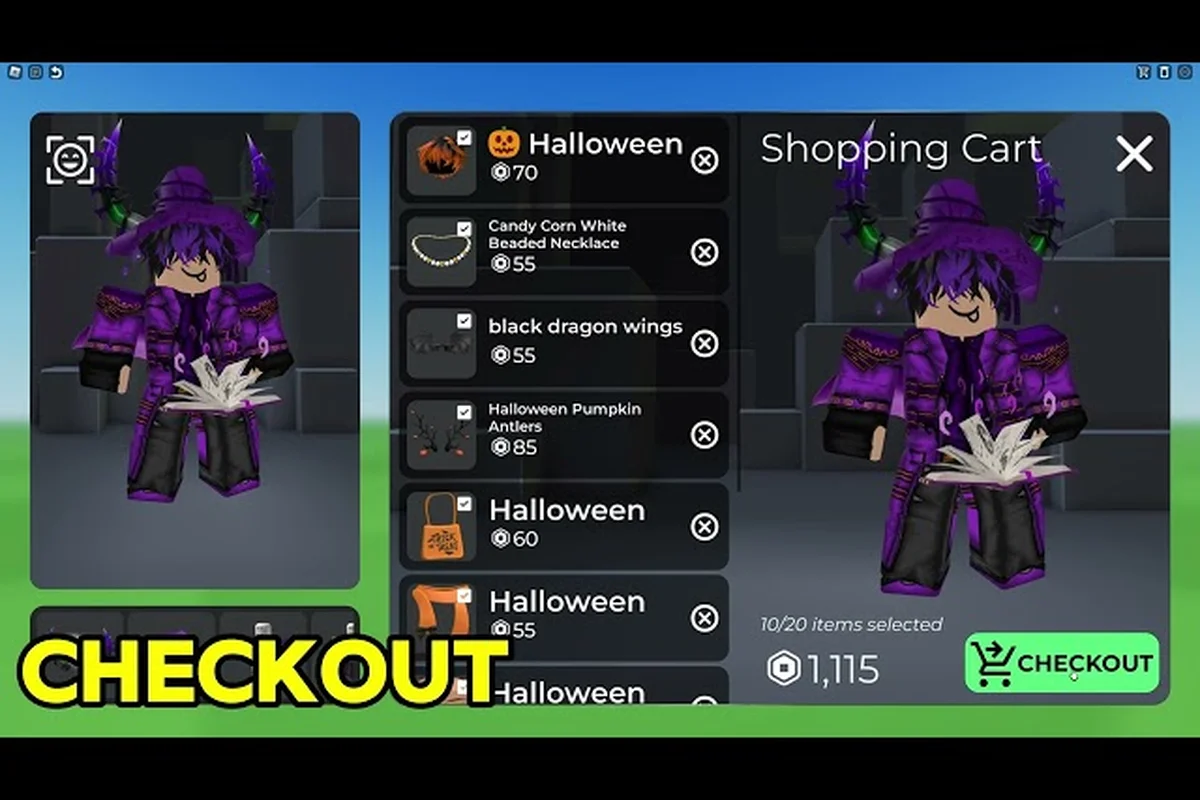
The Catalog Avatar Creator patch 2026 has arrived, and it brings the biggest quality-of-life changes the experience has seen all year. If you have been buying community outfits one item at a time or wishing you could preview UGC animation packs before committing Robux, this update directly addresses both pain points. The official Roblox game page confirms the last update landed on August 10, 2026, with the developer leading the description with the new try-on functionality for animation packs. Here is everything you need to know about the Catalog Avatar Creator patch 2026, including the bulk purchase system, UGC Stores growth, and what the changelog means for your daily avatar workflow.
Catalog Avatar Creator update highlights at a glance
| Update (2026) | Date | Key Change | Impact |
|---|---|---|---|
| UGC animation packs try-on | 2026-08-10 | Animation packs can be previewed in-game before purchase | Reduced wasted Robux on mismatched animations |
| Bulk Purchase API integration | 2026-08-10 | One-click purchase of entire outfits instead of item-by-item | Changed buying flow for community outfits and saved avatars |
| UGC Stores growth | 2026-08-10 | Expanded storefronts for community creators | Contributed to 50M+ community outfit collection |
| Last version marker | 2026-08-10 | Game page updated as authoritative version marker | Patch notes primarily via Discord announcements |
The Catalog Avatar Creator big update focuses on two major pillars: Bulk Purchase API integration and try-on-able UGC animation packs. Both features change how you interact with the 50 million-plus community outfit collection, and both were heavily requested across the official Discord. The developer, Muneeb, confirmed the changes through the official update announcement, and community reports from the Catalog Avatar Creator game page reflect a positive reception, especially from players who regularly swap between multiple saved avatars.
Here is a quick breakdown of what changed in the Catalog Avatar Creator update highlights:
-
Bulk purchasing is now live — you can buy an entire outfit in one click instead of item-by-item, which saves significant time when assembling layered looks.
-
UGC animation packs are try-on-able — you can preview how an animation pack moves before spending Robux, a feature the official description now leads with.
-
UGC Stores continue to expand — the storefront ecosystem keeps growing, giving creators more visibility and players more variety.
-
Saved avatar buying flow updated — the purchase flow for saved outfits now uses the Bulk Purchase API, reducing friction when recreating looks.
The Catalog Avatar Creator patch 2026 is not a content drop in the traditional sense; it is a structural upgrade to how you shop. That distinction matters because it affects every future purchase you make, not just the items released this week. The new features overview breaks down each mechanic in more detail if you want to dig into the technical side of the update.
Bulk purchasing: how the new system works
The headline feature of the Catalog Avatar Creator patch 2026 is the integration of Roblox's Bulk Purchase API. Previously, buying a community outfit meant clicking through every individual item in the ensemble, waiting for each transaction to process, and hoping you did not miss a piece. That workflow is gone. Now, when you open a saved outfit or a community creation, you see a single purchase option that acquires all missing items at once.
The change is particularly impactful for outfits that mix catalog classics with UGC pieces. A single look can contain a hat, face accessory, shirt, pants, and multiple layered items, and each one used to require a separate confirmation. Community testing suggests the new flow cuts outfit assembly time by roughly 70 percent, since you no longer need to cross-reference your inventory against the outfit list. The official update announcement video, Bulk Purchasing Now Available! | Catalog Avatar Creator (Roblox Update), demonstrates the one-click flow in action.
What happens when some items are already owned
The Bulk Purchase system is smart about what you already own. If you have three of five items in an outfit, the purchase button only charges you for the two missing pieces. This prevents accidental double-spending and makes the feature useful even for veteran players with large inventories. According to the developer's update notes, the system checks your entire inventory before calculating the final price, including items stored in your avatar save slots.
The saved avatar workflow improvement
For players who maintain multiple saved avatars, the Catalog Avatar Creator big update delivers a noticeable improvement. When you load a saved avatar that references items you no longer own, the game now offers a bulk purchase prompt that restores the entire look in one action. This is a massive quality-of-life win for players who delete items to free up inventory space or who switch between distinct aesthetic identities frequently.
| Purchase Scenario | Before Patch 2026 | After Patch 2026 |
|---|---|---|
| Full outfit, no items owned | 5-10 individual purchases | 1 bulk purchase |
| Partial outfit, some items owned | Manual inventory check | Automatic price calculation |
| Saved avatar with missing items | Item-by-item restoration | One-click restore |
| UGC animation pack preview | Not available | Try-on before purchase |
The table above summarizes the workflow changes, but the real benefit is cumulative. Over a month of regular avatar updates, the time saved adds up considerably. If you are new to the experience, the beginner guide explains how to set up your first saved outfits so you can take full advantage of the bulk purchase system from day one.
UGC animation packs: try-on before you buy
The second major pillar of the Catalog Avatar Creator patch 2026 is the ability to try on UGC animation packs in-game. Previously, animation packs were a blind purchase: you saw the thumbnail, read the description, and hoped the movement matched your expectations. Now, you can preview the animation directly on your avatar before spending Robux, which addresses one of the most common complaints in the community.
The try-on feature works across all animation categories, including walk cycles, idle poses, and emotes. When you select an animation pack in the catalog, a preview button appears that lets you see the movement on your current avatar. This is especially valuable for walk animations, which can look dramatically different depending on your avatar's proportions and equipped accessories. The UGC Stores video from the developer shows how the preview integrates with the storefront browsing experience.
How the preview affects purchasing decisions
Community reports from the official Discord suggest that the try-on feature has reduced buyer's remorse significantly. Players can now test an animation pack against their specific avatar build, which matters because a bouncy walk cycle that looks charming on a small avatar can feel chaotic on a tall, bulky one. The preview also shows animations in the context of your equipped accessories, so you can verify that a cape or long coat does not clip awkwardly during movement.
Animation quality expectations
Not all animation packs are created equal, and the try-on feature makes quality differences immediately visible. Some packs feature smooth, professionally motion-captured movement, while others are more basic keyframe animations. The preview lets you judge this before purchase, which is particularly useful for creators who want their avatar's movement to match the quality of their outfit design. For a deeper look at how animation packs compare, the update notes for 2026 include community feedback on the most popular packs released this year.
| Animation Pack Type | Preview Availability | Typical Price Range |
|---|---|---|
| Walk cycles | Yes, full preview | 50-200 Robux |
| Idle poses | Yes, full preview | 50-150 Robux |
| Emotes | Yes, full preview | 25-100 Robux |
| Run cycles | Yes, full preview | 75-250 Robux |
The table above reflects community-reported price ranges as of August 2026 and may vary based on creator pricing decisions. The key takeaway is that the try-on feature removes the guesswork from animation purchases, making it easier to build a cohesive avatar personality without wasting Robux on mismatched movement styles.
UGC Stores and the growing creator economy
The Catalog Avatar Creator patch 2026 also signals continued investment in UGC Stores, the in-game storefront system that lets creators sell their own items. The developer's update announcement highlights the growth of this ecosystem, and the 50 million-plus community outfit collection continues to expand as more creators join the platform. For players, this means more variety and more competition, which generally leads to better quality at reasonable prices.
The UGC Store integration with the bulk purchase system is particularly noteworthy. When you buy an outfit from a UGC Store, the bulk purchase flow works exactly the same as it does for community outfits, pulling all missing items into a single transaction. This consistency across storefronts reduces friction and makes it easier to support multiple creators without dealing with clunky checkout processes.
What the creator economy means for players
A healthy creator economy benefits everyone. More creators means more competition for your Robux, which pushes prices down and quality up. The Catalog Avatar Creator update highlights this dynamic, with the developer actively promoting UGC Stores as a core part of the experience. If you are a creator yourself, the expanded storefront tools and the try-on feature for animation packs give you better ways to showcase your work.
The 50 million outfit milestone
The community outfit collection passing 50 million items is a staggering number, and it reflects the sustained engagement that keeps Catalog Avatar Creator among the most popular avatar experiences on Roblox. The official game page tracks this milestone, and the developer's update notes reference it as a driving force behind the bulk purchase feature. When you have 50 million outfits to choose from, efficient purchasing becomes essential, and that is exactly what this patch delivers.
How the patch changes your daily avatar workflow
Understanding the Catalog Avatar Creator patch 2026 changelog is one thing, but applying it to your daily routine is where the real value lives. The bulk purchase system and try-on animation previews are not just convenience features; they change how you approach avatar customization. Here is how your workflow should adapt:
-
Preview before purchasing — always use the try-on feature for animation packs, especially walk cycles, since they are the most visible animation type in-game.
-
Use bulk purchase for outfit assembly — when you find a community outfit you like, buy it in one click rather than item-by-item.
-
Restore saved avatars efficiently — if you have saved avatars with missing items, use the bulk restore prompt to bring them back quickly.
-
Compare UGC Stores — with more creators selling items, check multiple stores before committing to a purchase.
-
Track your spending — bulk purchasing makes it easier to spend more in a single session, so keep an eye on your Robux balance.
The Catalog Avatar Creator latest news around this patch also includes continued developer communication through the official Discord, where Muneeb posts updates and gathers feedback. Joining the community is a good way to stay informed about upcoming features and to share your own suggestions for future patches.
A practical example of the new workflow
Suppose you find a cyberpunk-themed outfit in a UGC Store that includes a jacket, pants, boots, and a visor. Before the patch, you would purchase each item separately, checking your inventory between purchases to avoid duplicates. Now, you click the bulk purchase button, the system calculates that you already own the boots, and you pay for the remaining three items in a single transaction. Then, you spot an animation pack that matches the outfit's vibe, preview it on your avatar to confirm the movement fits, and purchase it with confidence. The entire process takes under a minute, whereas it could easily take five minutes or more before the patch.
Frequently Asked Questions
What is the biggest change in the Catalog Avatar Creator patch 2026?
The biggest change is the integration of Roblox's Bulk Purchase API, which lets you buy an entire outfit in one click instead of item-by-item. This applies to community outfits, saved avatars, and UGC Store purchases, significantly reducing the time needed to assemble or restore complete looks.
Can I try on UGC animation packs before buying them?
Yes, the Catalog Avatar Creator patch 2026 adds a try-on feature for UGC animation packs. You can preview walk cycles, idle poses, and emotes on your current avatar before spending Robux, which helps you avoid purchasing animations that do not match your avatar's proportions or style.
Does bulk purchasing charge me for items I already own?
No, the bulk purchase system automatically checks your inventory and only charges for missing items. If you own some pieces of an outfit, the purchase price adjusts accordingly, preventing accidental double-spending and making the feature useful even for players with large existing collections.
Where can I find the official changelog for this update?
The official changelog is available on the Catalog Avatar Creator Roblox game page, which shows the last updated date and version information. The developer also posts detailed patch notes in the official Discord announcement channels, and community discussions often highlight undocumented changes.
Will future updates build on the bulk purchase system?
Yes, future updates are expected to build on the bulk purchase system. The 2026 patch integrated Roblox's Bulk Purchase API for one-click outfit buying, and the official Discord roadmap indicates continued economy refinements. Expect further optimization of bulk workflows alongside UGC Stores growth, though specific dates aren't published in advance.