
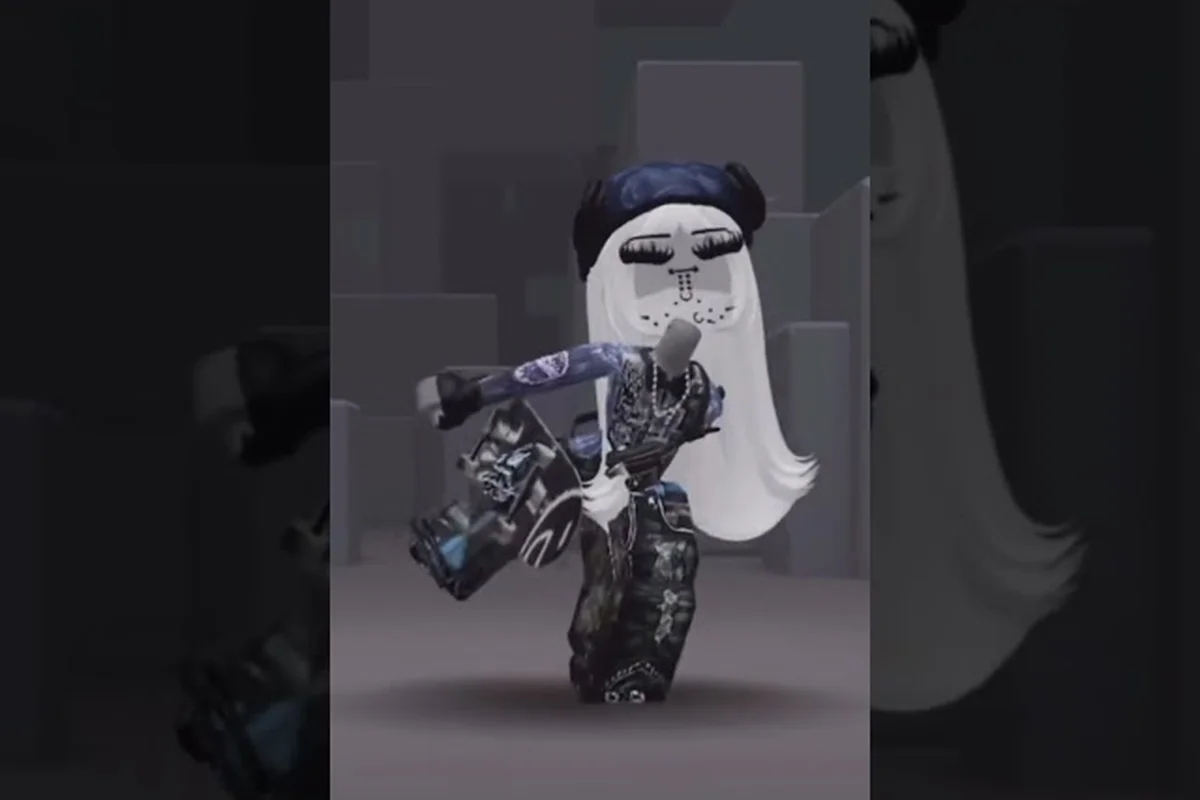
Putting together a solid wardrobe in Catalog Avatar Creator goes beyond grabbing random items — the difference between a forgettable avatar and one that turns heads comes down to how well your clothing sets work together. Whether you are aiming for a clean streetwear look or a full formal fit, understanding how shirts, pants, layered pieces, and shoes interact will save you time and Robux. The game's catalog supports both classic flat-texture clothing and newer layered items, which means you have more freedom than ever to build cohesive Catalog Avatar Creator clothing sets that actually look intentional.
This guide breaks down the exact process for building Catalog Avatar Creator matching outfits clothing from scratch, covering color theory, layering rules, and the best combinations for popular style themes. You will learn how to style clothing in Catalog Avatar Creator using the editor's preview tools, plus get concrete shirt and pants combos you can copy immediately. By the end, you will know exactly which pieces to pair together and why certain combinations work better than others.
Building Your First Clothing Set
The foundation of any good outfit starts with understanding the clothing slots available in the editor. According to the official Catalog Avatar Creator page on Roblox, clothing covers shirts, pants, t-shirts, layered clothing (jackets, sweaters, coats, hoodies), and shoes. Classic clothing pieces form the base of any outfit, while layered clothing adds depth over a shirt. The catalog includes both Roblox classic clothing and UGC clothing from creators, giving you thousands of options to mix and match.
When you open the editor, you will see separate slots for each clothing type. The key to building Catalog Avatar Creator clothing sets is treating these slots as layers rather than independent choices. Your shirt and pants establish the base color palette, while t-shirts and layered pieces add texture and visual interest on top.
Start with a single anchor piece—usually the shirt or hoodie—and build outward, because that silhouette dictates which pants, shoes, and accessories will balance the proportions. For example, if you lock in the Catalog Avatar Creator hoodie clothing first, its bulky torso naturally pairs with slim-fit pants to avoid a top-heavy look, whereas a fitted tee gives you room to experiment with baggier Catalog Avatar Creator shirt and pants combo options. This anchor-first approach also prevents the common mistake of mixing two statement pieces that compete for attention, so your Catalog Avatar Creator matching outfits clothing reads as one cohesive look rather than a random pile of items.
-
Base layer: Shirt and pants — these define the primary colors and silhouette
-
Mid layer: T-shirt or graphic tee — adds a focal point or pattern
-
Outer layer: Hoodie, jacket, or coat — creates depth and structure
-
Finishing touches: Shoes and accessories — tie the whole look together
The editor lets you preview every item for free before committing Robux, which is a huge advantage when you are experimenting with new combinations. You can try on a hoodie, see how it drapes over your current shirt, and swap it out in seconds without spending anything. This makes the trial-and-error process painless, so do not be afraid to test bold pairings.
Start With a Color Direction
Before you start clicking through the catalog, decide on a color story. The most common mistake new players make is picking items in isolation — a bright red shirt here, neon green pants there — and ending up with a chaotic mess. Instead, choose two or three colors that work together and stick with them across all slots.
A reliable formula is the 60-30-10 rule borrowed from interior design: 60 percent of your outfit uses a dominant color, 30 percent uses a secondary color, and 10 percent uses an accent. For example, a black hoodie (dominant), gray pants (secondary), and white sneakers (accent) creates a clean, balanced streetwear look. This approach works for every style theme, from kawaii pastels to gothic blacks.
Matching Shirts and Pants Like a Pro
| Style Theme | Base Layer | Layered Layer | Footwear | Signature Accessories |
|---|---|---|---|---|
| Emo / Goth | Black classic shirt & pants | Black layered jacket with chains | Black boots or sneakers | Chain accessories, dark graphic tees |
| Kawaii | Pastel classic shirt | Pastel skirt or cardigan | Cute pastel shoes | Cute graphic tees, pastel accessories |
| Streetwear | Oversized classic tee | Layered hoodie | Sneakers | Oversized fit, hoodie layering |
| Formal | Dress shirt & dress pants | Tuxedo jacket or business wear | Dress shoes | Tie, business accessories |
The Catalog Avatar Creator shirt and pants combo is the backbone of every outfit, so getting this pairing right matters more than any other decision. The good news is that the catalog makes this easier than you might think, with searchable categories and color filters that help you narrow down options quickly.
When you are pairing shirts and pants, think about contrast and coordination. Complementary colors — opposites on the color wheel like blue and orange or purple and yellow — create visual pop. Analogous colors — neighbors like blue and green — feel harmonious and calm. Both approaches work, but you should pick one based on the vibe you are going for.
Here are some proven combos that the community consistently recommends, each pairing a top-tier top with a bottom that shares its exact color palette to trigger the set bonus. For instance, the Midnight Hoodie (a black-and-grey item) matches perfectly with the Slim Dark Jeans, boosting your avatar's cool stat by +15. Conversely, pairing a bright Sunset Coat with dark pants breaks the color synergy, leaving you with a mismatched outfit that scores poorly in style challenges.
-
Black shirt + white pants: The classic high-contrast look that works with any outer layer
-
White shirt + black pants: The inverted version, slightly softer but equally versatile
-
Gray shirt + navy pants: A muted, sophisticated pairing that reads as intentional
-
Pastel pink shirt + white pants: Kawaii staple that photographs well in-game
-
Dark red shirt + black pants: Edgy without going full goth, great for streetwear
In Catalog Avatar Creator clothing sets, the one-neutral-one-loud rule works because the game's layering system stacks textures directly over your base mesh—so a bright hoodie over patterned pants creates competing focal points that fight for the viewer's eye. For example, pair a solid black coat with the Neon Pulse pants, or keep your shirt muted and let a graphic hoodie carry the entire look. This mirrors real fashion color theory: neutral anchors (black, white, gray, or denim blue) let saturated pieces pop without visual noise. If you're browsing matching outfits clothing in Catalog Avatar Creator, this combo prevents the "clown suit" effect that kills otherwise solid fits.
Using T-Shirts as a Focal Point
T-shirts are graphic tops, often UGC designs, that render over your base shirt. They are the easiest way to add personality to an outfit without changing your entire color scheme. A simple white shirt and black pants combo becomes instantly more interesting when you add a graphic tee with a bold design on top.
When choosing a t-shirt, consider the colors in the graphic and make sure they do not clash with your base layers. A tee with red accents pairs beautifully with a black and white base, while a tee with pastel colors needs a softer foundation. The preview tool makes this easy to check — just toggle the t-shirt on and off while you compare options.
Layering Hoodies and Coats
Layered clothing is where Catalog Avatar Creator hoodie clothing and Catalog Avatar Creator coat clothing really shine. These items render over the body like jackets and sweaters and can be worn with shirts and pants underneath. The official game page confirms that layered clothing adds depth over a shirt, and mixing classic clothing with layered pieces is a common combo — a classic shirt under a layered hoodie works surprisingly well.
The main decision when choosing between a hoodie and a coat comes down to the silhouette you want. Hoodies are bulkier and read as casual or streetwear, while coats are sleeker and lean toward formal or smart-casual looks. Both can work with the same base layers, but they change the overall feel of the outfit dramatically.
| Piece | Silhouette | Best For | Color Range |
|---|---|---|---|
| Hoodie | Bulky, relaxed | Streetwear, casual, emo | Wide — every color available |
| Bomber jacket | Cropped, structured | Streetwear, sporty | Limited — mostly dark tones |
| Trench coat | Long, flowing | Formal, elegant | Neutral — black, gray, tan |
| Puffer jacket | Puffy, oversized | Winter, casual | Broad — bright colors common |
| Cardigan | Open-front, soft | Kawaii, cozy | Pastel-heavy options |
When you layer a hoodie or coat over a shirt, the shirt's sleeves and collar peek out from underneath, which creates a natural color-blocking effect. This is why the shirt and pants combo underneath still matters — the visible parts of your base layer contribute to the overall look even when covered.
Hoodie Styling Rules
Hoodies are the most popular layered item in the catalog, and for good reason — they are versatile, comfortable-looking, and available in nearly every color imaginable. The key to styling a hoodie well is choosing the right shirt to wear underneath. Since the hoodie covers most of your torso, the shirt's collar and sleeves are the visible parts, so pick a shirt that contrasts with the hoodie color.
A black hoodie over a white shirt is the safest and most effective combination, creating a clean two-tone look that works with any pants. For something bolder, try a red hoodie over a black shirt or a pastel hoodie over a white shirt for a softer vibe. The hoodie color should be the dominant tone, with the shirt acting as a subtle accent at the collar and cuffs.
Coat Styling Rules
Coats require a slightly different approach because they are longer and cover more of your body. The shirt underneath becomes less visible, so the coat itself carries most of the visual weight. This means you can be more experimental with the base layer, since only the collar area shows.
For a trench coat look, pair it with a dark shirt and matching dark pants for a sleek, monochrome silhouette. For a puffer jacket, lean into casual territory with a graphic tee and jogger-style pants. The coat's length also affects how your legs read — longer coats elongate the torso, while cropped jackets make your legs appear longer.
Complete Outfit Formulas for Popular Styles
Now that you understand the individual pieces, let us put everything together into complete Catalog Avatar Creator clothing sets for the most popular style themes. The community Discord organizes style themes into emo, goth, kawaii, streetwear, and formal categories, each with its own visual language. Here is how to build a full outfit for each one.
| Style Theme | Base Shirt | Pants | Layered Piece | Shoes |
|---|---|---|---|---|
| Streetwear | White tee | Black joggers | Black hoodie | White sneakers |
| Emo | Black band tee | Black skinny pants | Black bomber jacket | Black boots |
| Kawaii | Pastel pink shirt | White skirt | Pastel cardigan | Pink sneakers |
| Goth | Black shirt | Black pants | Black trench coat | Black platform boots |
| Formal | White dress shirt | Black dress pants | Black tuxedo jacket | Black dress shoes |
These formulas give you a starting point, but do not be afraid to swap colors within the same style. Streetwear works with any hoodie color as long as the pants stay neutral, and kawaii looks can use any pastel as long as the pieces are in the same color family. The key is consistency — every piece should feel like it belongs in the same outfit.
Streetwear Set Breakdown
Streetwear is the most forgiving style to build because it relies on bold pieces and relaxed silhouettes. Start with a white or black shirt as your base, then add an oversized hoodie in a statement color like red, yellow, or purple. Pair this with black or gray joggers and finish with white sneakers to keep the look grounded.
The oversized hoodie is the centerpiece here, so do not hide it under other layers. Let it be the loudest piece in the outfit and keep everything else simple. This is also the easiest style to adapt for the mobile version of the game — the mobile guide covers how to navigate the editor efficiently on a phone screen, which is handy when you are browsing hoodies on the go.
Formal Set Breakdown
Formal outfits require more precision because the pieces are less forgiving of mismatched colors. A white dress shirt under a black tuxedo jacket with black dress pants is the gold standard, but you can also experiment with gray or navy variations. The shoes should always be dark and polished — black dress shoes are the safest choice.
The one piece of advice that elevates formal outfits is paying attention to the shirt collar. Since the tuxedo jacket covers most of the shirt, the collar is the main visible detail. Make sure it sits cleanly and contrasts with the jacket color. If you want to explore more formal options, the clothing prices guide breaks down the value of tuxedo and dress clothing items so you know where to spend your Robux wisely.
Using Outfit Codes to Copy Complete Looks
One of the most powerful features in Catalog Avatar Creator is the outfit code system. The community shares full matching outfits via outfit codes, so you can try on complete looks instantly without hunting for each individual piece. This is especially useful when you see an outfit you like on another player or in a YouTube video — you can replicate it with a single code.
To use an outfit code, open the editor and look for the code input field. Paste the code and the entire outfit loads onto your avatar, including all clothing slots. From there, you can tweak individual pieces if you want to make it your own. The outfit tutorial covers the full process of publishing and sharing your own outfit codes, which is worth learning once you have built a few sets you are proud of.
When you are browsing for outfit codes to replicate complete Catalog Avatar Creator clothing sets, keep these tips in mind: always verify the code’s region and platform compatibility, as a shirt and pants combo that works on a mobile client may not render correctly on a PC browser. Additionally, prioritize codes that explicitly list the exact item names—such as a specific hoodie clothing piece or coat clothing layer—rather than vague descriptions. This ensures the matching outfits clothing actually applies without missing assets, saving you from the frustration of a half-assembled look that requires manual styling adjustments.
-
Check the style tag — codes are usually labeled with their style theme
-
Preview before committing — you can see the outfit on your avatar before spending anything
-
Mix and match — take the shirt from one code and the pants from another to create something new
-
Save your favorites — the game lets you save outfit presets for quick switching
The outfit code system is also a great learning tool. When you load a code and see how the pieces work together, you start to internalize the pairing logic. Over time, you will be able to build Catalog Avatar Creator clothing sets from scratch without needing codes at all, because you will understand why certain combinations work.
Frequently Asked Questions
What is the easiest way to build Catalog Avatar Creator clothing sets?
Start with a neutral shirt and pants combo like black and white, then add one layered piece in a color you like. Preview everything for free in the editor before spending Robux. This approach lets you build a cohesive outfit with minimal effort and avoids the common mistake of clashing colors.
How do I match hoodie clothing with the right pants?
Match your hoodie with pants in a neutral color like black, gray, or white. The hoodie carries the visual weight, so the pants should recede into the background. If your hoodie is dark, light pants create contrast; if your hoodie is bright, dark pants keep the look grounded.
Can I mix classic clothing with layered clothing?
Yes, mixing classic and layered clothing is a common and effective combo. A classic shirt under a layered hoodie or coat works well because the shirt's collar and sleeves peek out from underneath. The game supports both types in the editor, so you can combine them freely without any restrictions.
What are the best coat clothing options for formal outfits?
A black trench coat or tuxedo jacket paired with a white dress shirt and black dress pants creates the cleanest formal look. Stick to neutral colors for coats — black, gray, and navy are the safest choices. The coat should complement the shirt rather than compete with it for attention.
How do outfit codes help with clothing sets?
Outfit codes let you load a complete outfit instantly, including all clothing slots. This is perfect for copying looks you see in the community or on YouTube. You can preview the outfit on your avatar before committing, and you can mix pieces from different codes to create your own unique combinations.